
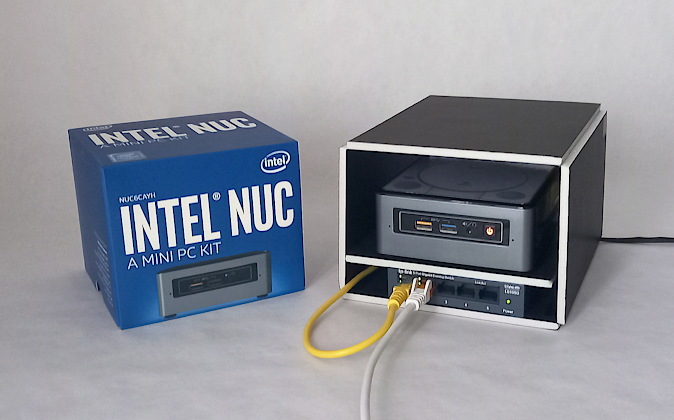
I write in Markdown, and I needed that material to be private by design until the moment I chose to publish it. No cloud service offers that guarantee: there is always a third party with the technical ability to read what you store. So I built my own. I set up a Joplin server (an open-source Markdown note-taking application with end to end encryption) on a modest home NUC, an Intel Celeron J3455 with 8 GB of RAM running Linux Mint, powered on 24/7. I draft and edit in sync across laptop, desktop and phone, and only once an article is essentially finished do I import it into WordPress for the final pass in Gutenberg.
The resulting architecture: remote HTTPS access over a hostname of my own, end to end encryption (the server cannot read the notes even if it wanted to), and the data held in a LUKS volume, unreadable even if someone walked off with the physical disk, with backups on a second, independent encrypted volume. The volume unlocks itself at boot through a systemd unit, and accepts three different ways in: an emergency passphrase, a keyfile on a USB drive, and the automatic keyfile used at startup.
Exposing that server to the internet from a residential connection meant solving two chained networking problems. The first, keeping a stable hostname despite a dynamic IP, came down to DDNS, after discarding an initial provider whose community domain would not let me automate DNS records. The second was more stubborn: my ISP blocks inbound ports 80 and 443, and Let’s Encrypt validates by default with the HTTP-01 method, which consists precisely of receiving an inbound connection on port 80. The symptom was an opaque Caddy timeout while requesting the certificate, and the thing that cracked it open was realising the timeout was not mine: it was Let’s Encrypt trying to reach me and failing. The way out was to switch to DNS-01 validation, which proves domain ownership by publishing a temporary TXT record instead of waiting for a connection, so the certificate is issued without opening a single port. The service ended up published on a non-standard port through port forwarding on the router, with Caddy acting as a reverse proxy and terminating TLS.
The hardest problem showed up when I moved PostgreSQL, the database where Joplin stores notes and attachments as binary data, off the system disk and onto the large data partition, which is formatted as NTFS. PostgreSQL demands Unix permissions and real file locking, and NTFS cannot give it either. The solution was to create a loopback image on that partition: a file that behaves like a virtual disk, formatted as ext4 and encrypted with LUKS. PostgreSQL gets a legitimate Linux filesystem without having to leave the existing NTFS disk, and as a bonus the volume ended up consolidated as the single encrypted store for every service that came later.
When I rebuilt that volume from scratch in a later session, PostgreSQL refused to initialise. The volume looked empty, and that was the trap: formatting as ext4 automatically creates a lost+found directory at the root, and PostgreSQL requires its data directory to be completely empty before initialising, so it aborted the moment it found one. The cause was not in PostgreSQL but in how ext4 behaves at filesystem creation, which is exactly where nobody looks. Neither of them is doing anything wrong; they simply hold incompatible assumptions. I fixed it by declaring the PGDATA variable in the Docker Compose file, pointing at a subdirectory inside the mount point rather than at its root: that subdirectory is born empty on first initialisation and inherits no lost+found. Without that variable, PostgreSQL will not start on a freshly formatted ext4 volume. There is no alternative.
The server kept growing until it hosted several more services (a CalDAV/CardDAV contact manager, file synchronisation), all on that same encrypted volume. Since the NUC has no monitor and I administer it remotely over NoMachine and xRDP, I ran into an elusive failure: xRDP died the instant I logged in, without leaving a single useful error in the logs. My first hypothesis was that NoMachine and xRDP were stepping on each other by using the same display number (:10), so I shut NoMachine down entirely and tried xRDP on its own. The failure repeated identically, which ruled that path out cleanly. Days earlier, a different problem on the same machine (a file manager that failed when launched remotely) had forced me to understand that on a headless box with constant reconnections, the D-Bus environment of a user session does not stay in sync with the active graphical session. I recognised the same pattern here, and reviewing the session startup script (startwm.sh) I found the cause: it pointed at a D-Bus bus shared across every remote session instead of creating a private one per session. A shared bus can drag stale state over from an earlier failed attempt, and that registration clash kills the session before it manages to print anything at all. Replacing that line with dbus-launch --exit-with-session gives each session a fresh, isolated bus, which eliminates the collision by design rather than dodging it.